Booking Software That Worx.

ReserveWorx takes online bookings for your tours and rentals, keeps every asset and guide from double-booking, collects waivers and payments, and gets guests out the door faster.

Built for operators who rent, guide and host


boat rentals


boat tours & charters


Jet ski rentals & Tours


VENUE RENTALS


Kayak Rentals & Tours


Rafting


Watersports


SpA & WELLNESS


ATV Rentals & Tours


Axe throwing


Escape Rooms


Party Centers


Bike Rentals


Coach & Bus tours


walking tours


immersive experiences


EVERYTHING IN ONE PLATFORM

From the first click to the five-star review

One system for bookings, the front desk, operations, the money and the follow-up. No stack of add-on apps.

Booking

A booking page guests actually finish, on your site or ours, on any phone.

Online booking catalog


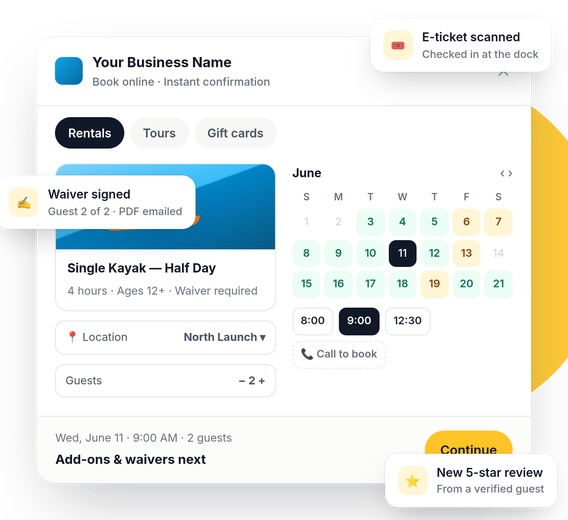
A clean public catalog with a month calendar, real-time availability and instant confirmation.


Tours vs. Rentals


Scheduled departures and by-the-hour rentals, grouped the way guests shop.


Multi-location


Run every launch, beach or shop from one account, with a location picker for guests.


Shared Inventory


Time-based Boats & Gear pools shared across services and locations. No double-booking, ever.

Call to book


Closed or full times show a tap-to-call button instead of disappearing, so you never lose the lead.

Add-ons & particpants


Upsell gear and extras, and capture every participant's details at checkout.

WordPress plug-in & website embed


Drop the booking widget into WordPress or use our website snippet builder

Waitlist


Sold out? Guests join a waitlist and you fill the spot when it opens up.

Sales Channels


Sell through online travel agencies on the same live inventory, with GroupOn, GetYourGuide, Viator and Expedia connectors on the way.


Operations

Paperwork, check-in and the fleet, handled before guests reach the counter.

Online waivers


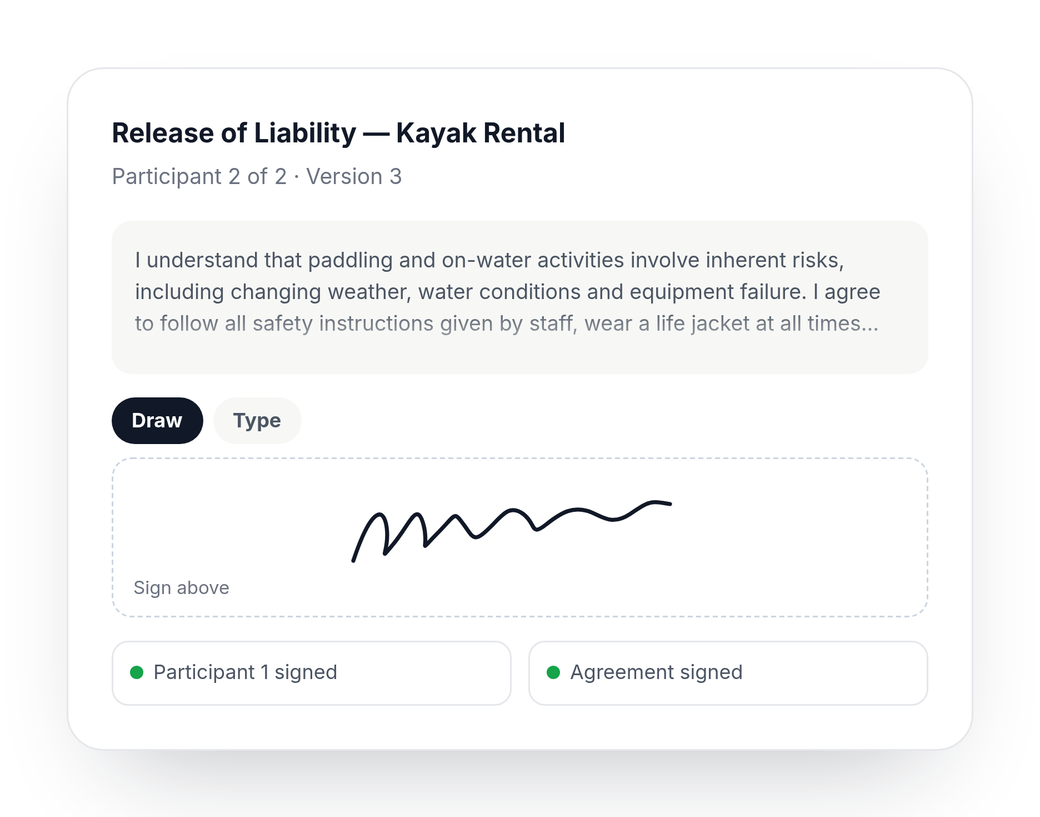
Every participant signs with a drawn or typed e-signature. Minors signed by a guardian. PDF copies emailed and stored.

Rental agreements


Per-boat or per-item agreements signed once by the renter, with a handover gate before keys change hands.

Damage & condition checks


Before-and-after photos, side-by-side comparison and a return gate, so damage disputes end fast.

E-tickets & scanner


One signed e-ticket per guest. Staff scan, even offline, with first-scan-wins check-in.


Staff calendar & manifests


See every departure, rental and roster on one calendar, with per-session manifests.

Daily load sheet


One fleet count across locations, and a morning sheet of what goes where. Hold back units for walk-ins.


Guests & history


Every guest, participant, booking, waiver and receipt in one profile.

Maintenance & incidents


Schedule maintenance, block units, log incidents, and track extensions and late returns.

Guided setup


A step-by-step setup checklist that takes new owners from sign-up to first booking.

Payments

Get paid online, at the counter and after the trip, straight to your own account.

Payments


Deposits, balances and refunds paid directly to your own account.

Point of Sale


Ring up walk-ins with card, cash or gift card, print receipts and close out the drawer.

Gift Cards


Sell gift cards online, issue them at the counter and redeem them at checkout.

Payment Requests


Text or email a secure payment link for a balance, a deposit or an extra charge.

Guest Tabs


Keep a card on file with a limit, add charges through the day, and charge once at close.

Tips for Crew


Guests tip the crew after the trip. Split by guide, with payroll reports by guide and day.

Corporate accounts


Billing contacts, linked guests, invoices, payments and statements for groups and companies.

Dynamic Pricing


Rules for peak days, seasons and demand, with a price preview before you save.

Quickbooks export


Export to QuickBooks Online or Desktop, with a direct QuickBooks Online connection.

Growth

Win back lost bookings, earn reviews and bring guests back next season.

Cart recovery


Guests who leave mid-checkout get a friendly email to finish, and you see the revenue it recovers.

Reviews & widget


Verified reviews from real guests, moderation, review links, and ratings on your booking page.

Promo codes


Percent or fixed discounts, limited by date or use, up to fully comped bookings.

Feedback


Ask every guest how it went and catch problems before they become reviews.

Brandworx CRM


Every booking, check-in and payment syncs to BrandWorx to power texts, emails and follow-ups.

Reports


Bookings, revenue, channels, gift cards and drawer reports, with CSV exports.

Waivers and agreements guests sign on their phone.

Paperwork, done before they arrive, no additional cost.

Send the link with the confirmation. Guests sign from the parking lot, and your staff see who's ready at a glance.


  • Draw or type a signature - finger on a phone, mouse on a laptop
  • One waiver per participant, with a guardian signing for minors
  • Rental agreements per asset, signed once by the renter
  • PDF copies stored on the guest record and emailed automatically.

Go Live in an afternoon!

Our guided setup walks you through it, one step at a time.

Step one

Add your information

Set up locations, inventory, schedules, waivers and agreements. The setup checklist ticks off as you go.


Step two

Connect to payments

Connect your account, then share your booking page or embed it on your website with the WordPress plug-in.

Step three

Take bookings & get paid

Guests book, sign and pay online. Your team checks them in, runs the day and gets the reviews.

Transparent Pricing

Advanced

3% booking fee


(paid by you or the customer - you choose)


Unlimited bookings

Unlimited locations

Unlimited

staff

All features unlocked

No Monthly Charge.


No Contracts.


No off season  charges.


No booking fee for in-person transactions

No off season charges.


No booking fee for in-person transactions


FAQs

Questions operators ask

  • Can I run tours and rentals from the same account?

    Yes. Scheduled tours and time-based rentals live side by side, grouped separately on your booking page, and they can draw from the same pool of boats and gear without double-booking.

  • I have more than one location. Does that work?

    Yes. Add as many locations as you need. Guests pick a location when they book, and you can share one fleet count across locations with a daily load sheet of what goes where.


  • How do waivers and rental agreements work?

    Each participant signs a waiver online with a drawn or typed signature, and a guardian signs for minors. Rental agreements are signed once per booking by the renter. Signed PDFs are stored on the guest and emailed.

  • Can I put booking on my existing website?

    Yes. Use the WordPress plug-in, or paste an embed snippet into any website. You also get a hosted booking page you can share anywhere.


  • Does it work with my accounting and marketing tools?

    ReserveWorx exports to QuickBooks Online and Desktop, connects to QuickBooks Online directly, and syncs guests and booking events to BrandWorx for texts, emails and follow-ups.